Having Odoo doesn't mean you have an e-commerce platform. Having the eCommerce module activated doesn't mean you have a store that sells either. Anyone who's tried to set up a B2B and B2C catalog on the same instance knows this and ended up with conflicting pricing, customers seeing incorrect rates, or a checkout process that scares away wholesale buyers.
Odoo can perfectly support both business-to-business and business-to-consumer sales models within a single system. The question isn't whether Odoo allows it. It's how you configure it so that each audience can buy in their own way, without one negatively impacting the other's experience.
Here's the step-by-step guide. No filler.
Before setting anything up: one website or two?
This is the first decision, and it affects everything else. Odoo supports native multi-site architecture on a single database, so technically you can set up a single store for both audiences or separate B2B and B2C into two websites with their own domains, without duplicating stock, products, or CRM.
- A single website makes sense if the catalog overlaps significantly between B2B and B2C, or if the volume of each channel doesn't justify maintaining two sites with their own content. This can be achieved with separate price lists and restricted access to the B2B catalog.
- Having two websites makes sense if the B2B sales cycle needs different content, tone, and calls to action (less "buy now," more "request a proposal"), or if the catalog or terms differ too much to coexist well in a single experience.
With that decision made, the rest of the configuration is essentially the same, whether or not the domain changes.
Step 1: Separate the catalog by audience, not by product
The first common mistake: creating a separate catalog for each channel. This means double the maintenance and doubles the margin of error in stock and pricing.
The correct way in Odoo is to have a single catalog and control visibility and price depending on who is viewing it:
- Activate Multi-Pricelists in Sales → Settings.
- Create a "General Public" (B2C) price list and one or more "Wholesale" or customer segment (B2B) price lists.
- Assign the corresponding price list to each customer record or, better yet, automate the assignment by customer category (Retail, Distributor, Wholesaler) from Contacts.
- If you work with two websites, assign a price list per site in Website → Settings → Websites, so that each domain displays its default rate.
This is what allows the same SKU to have a different price depending on who is buying, without touching the catalog or duplicating products.
Step 2: Configure B2B access as a portal, not as a generic checkout
A B2C buyer doesn't need to see exact stock levels, 30-day payment terms, or past order history. A B2B buyer does.
That's what the Customer Portal in Odoo is for, which can be activated from Website → eCommerce → Configuration:
- Activate "B2B Access" to restrict the catalog or special prices to logged-in users.
- Configure specific payment terms (30/60/90 days) per customer or category, instead of forcing immediate card payment.
- Enable online quotes: B2B customers request quotes, not direct purchases. This reduces friction in large purchasing decisions and increases the closing rate for high-value items.
This is the most overlooked point, and the one that wastes the most conversions: if your B2B buyer goes through the same checkout process as an individual buying a single unit, they'll leave. Not because of the product. Because of the process.
Step 3: Taxes and invoicing with Fiscal Position
In B2B, especially with customers from other countries or exempt from VAT, the fiscal position determines whether the sale is successfully completed or ends in a credit note.
- Configure the fiscal positions by country/customer type in Billing → Settings.
- Make sure that the checkout automatically applies the tax position according to the NIF/CIF entered, not manually.
- For B2C, keep the flow simplified: VAT included, no additional fields that slow down the conversion.
Step 4: Payment and delivery methods according to how each customer purchases
- B2C: card, Bizum, PayPal. One-step checkout. Less friction, better conversion.
- B2B: bank transfer, 30/60 day payment terms, line of credit. Here, conversion is not measured at checkout, but over the entire sales cycle.
Configure different delivery methods per warehouse if the B2B order is served from another logistics center (Inventory → Routes), and define different stock rules to prevent a B2C sale from consuming stock reserved for a B2B order that has already been closed.
Step 5: Measure each channel separately from day one
Having the store up and running isn't the goal. Making sure each channel contributes to the business in a measurable way is.
- B2C: conversion rate, average ticket, CAC by acquisition channel.
- B2B: sales cycle, quote-to-order conversion rate, LTV per account.
If you're not measuring this from within Odoo, not in a separate spreadsheet, the store is set up, but it's not managed.
Summary: What changes between B2B and B2C within Odoo
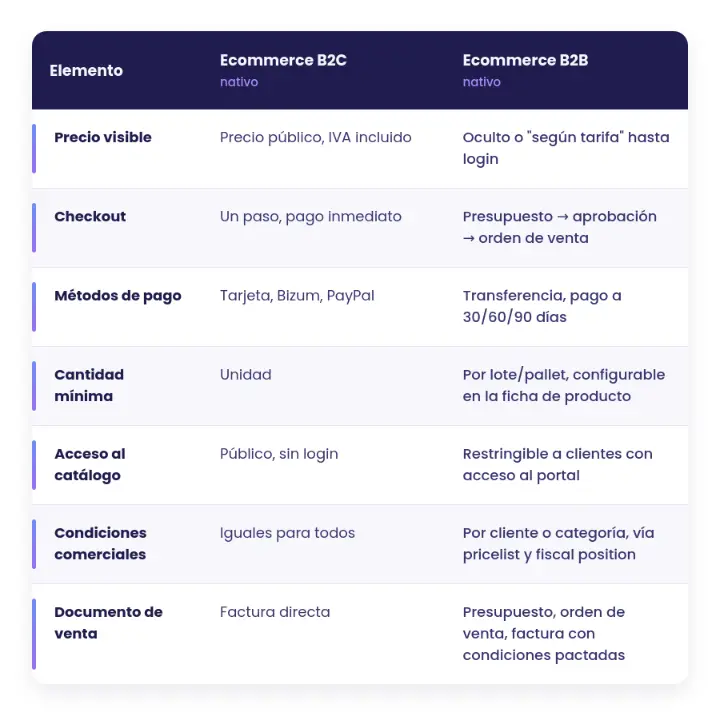
Activating the eCommerce module is the easy step. Configuring each row of this table according to your business model is what separates a store that generates revenue from a store that merely exists.
The difference between "having an ecommerce site" and "selling with an ecommerce site"
Setting up B2B and B2C in Odoo isn't technically complicated. Any experienced partner can activate the correct modules.
But, we need to manage how to generate sales.
That's where strategy comes in, not just implementation.
We don't implement Odoo. We sell it.
If your online store in Odoo is already up and running but isn't converting as well as it should, or if you still don't know where to start separating your B2B and B2C flows, let's talk .
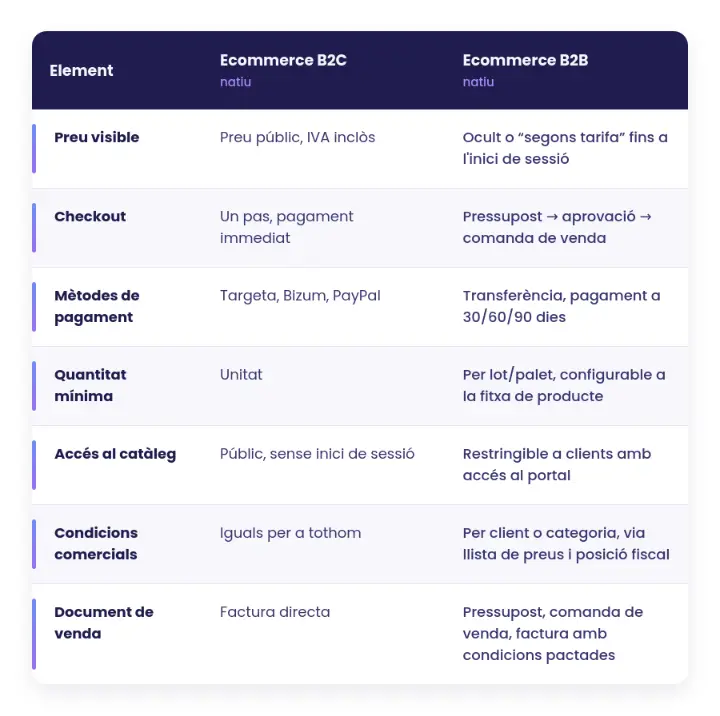
Activating the eCommerce module is the easy step. Configuring each row of this table according to your business model is what separates a store that generates revenue from a store that merely exists.
The difference between "having an ecommerce site" and "selling with an ecommerce site"
Setting up B2B and B2C in Odoo isn't technically complicated. Any experienced partner can activate the correct modules.
But, we need to manage how to generate sales.
That's where strategy comes in, not just implementation.
We don't implement Odoo. We sell it.
If your online store in Odoo is already up and running but isn't converting as well as it should, or if you still don't know where to start separating your B2B and B2C flows, let's talk .
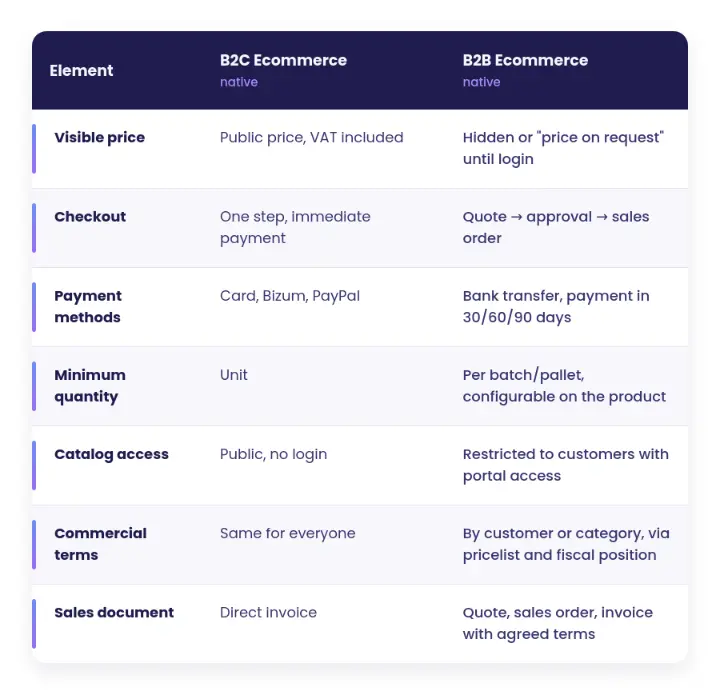
Activating the eCommerce module is the easy step. Configuring each row of this table according to your business model is what separates a store that generates revenue from a store that merely exists.
The difference between "having an ecommerce site" and "selling with an ecommerce site"
Setting up B2B and B2C in Odoo isn't technically complicated. Any experienced partner can activate the correct modules.
But, we need to manage how to generate sales.
That's where strategy comes in, not just implementation.
We don't implement Odoo. We sell it.
If your online store in Odoo is already up and running but isn't converting as well as it should, or if you still don't know where to start separating your B2B and B2C flows, let's talk .
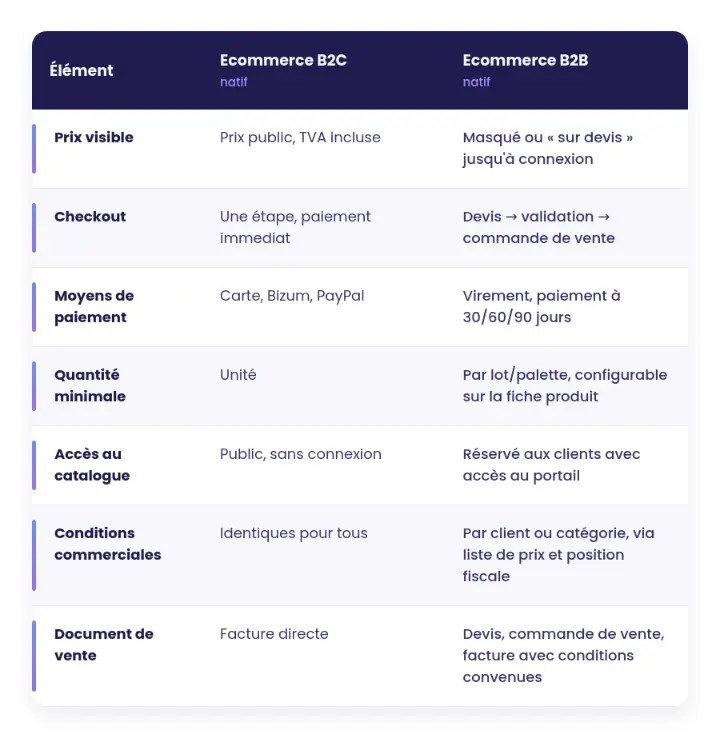
Activating the eCommerce module is the easy step. Configuring each row of this table according to your business model is what separates a store that generates revenue from a store that merely exists.
The difference between "having an ecommerce site" and "selling with an ecommerce site"
Setting up B2B and B2C in Odoo isn't technically complicated. Any experienced partner can activate the correct modules.
But, we need to manage how to generate sales.
That's where strategy comes in, not just implementation.
We don't implement Odoo. We sell it.
If your online store in Odoo is already up and running but isn't converting as well as it should, or if you still don't know where to start separating your B2B and B2C flows, let's talk .
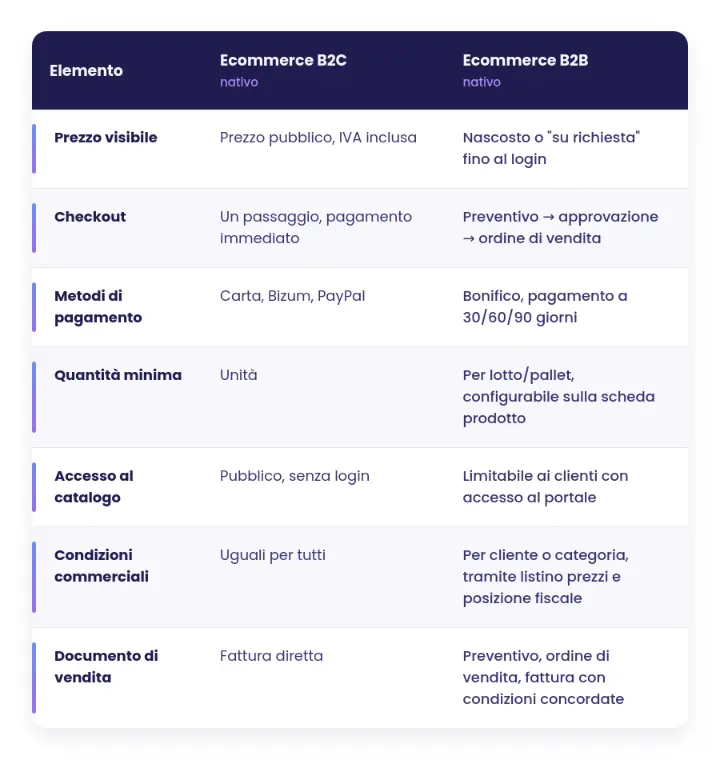
Activating the eCommerce module is the easy step. Configuring each row of this table according to your business model is what separates a store that generates revenue from a store that merely exists.
The difference between "having an ecommerce site" and "selling with an ecommerce site"
Setting up B2B and B2C in Odoo isn't technically complicated. Any experienced partner can activate the correct modules.
But, we need to manage how to generate sales.
That's where strategy comes in, not just implementation.
We don't implement Odoo. We sell it.
If your online store in Odoo is already up and running but isn't converting as well as it should, or if you still don't know where to start separating your B2B and B2C flows, let's talk .